
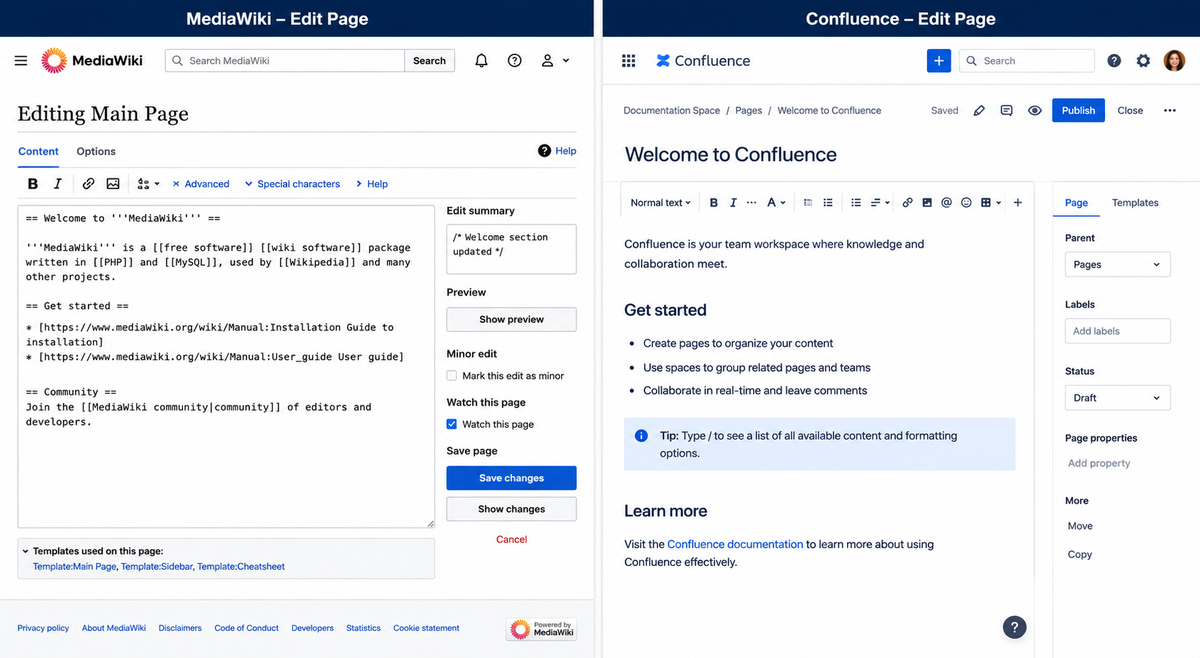
MediaWiki and Confluence are both used to organize knowledge: documentation, policies, procedures, project notes, technical references, and internal information.
But they are not really the same kind of tool.
MediaWiki is open source wiki software. It is best known as the software behind Wikipedia, but it is also used for public knowledge bases, private documentation sites, technical manuals, enterprise wikis, and large structured content projects.
Confluence is commercial team collaboration software from Atlassian. It is commonly used inside companies for internal documentation, project planning, team notes, and company knowledge bases.
This MediaWiki vs Confluence comparison is mainly for organizations deciding between an open source wiki they control and a commercial team workspace. Both can work well, but they lead to very different long-term decisions about hosting, cost, editing, structure, and content ownership.
Quick Answer
Choose MediaWiki if you want an open source wiki, strong long-term content ownership, public wiki support, advanced extensibility, structured content, or a system your organization can host and fully control.
Choose Confluence if you want a polished commercial collaboration tool, tight integration with other Atlassian products, easier editing for non-technical staff, and a vendor-managed cloud option.
Put more simply: MediaWiki is usually the better choice when the content itself is the long-term asset. Confluence is usually the better choice when the team workspace is the main asset.
What Is MediaWiki?
MediaWiki is open source wiki software written in PHP. It was originally created for Wikipedia, so it is built to handle large numbers of pages, many editors, revision history, templates, categories, files, permissions, extensions, and public collaboration.
It can be used for a small private wiki, but its strengths become much clearer when a wiki is large, public, long-lived, or heavily structured.
MediaWiki also has a large extension ecosystem. Depending on the site, it can be extended with visual editing, spam protection, semantic data, structured forms, advanced search, authentication integration, and many other features.
That flexibility is one of MediaWiki’s biggest advantages, but it also means the site should be maintained by someone who understands how MediaWiki, extensions, skins, caching, backups, and upgrades fit together.
What Is Confluence?
Confluence is a commercial knowledge base and collaboration platform from Atlassian. It is often used together with Jira, Trello, Bitbucket, and other Atlassian tools.
Confluence is designed for teams. It focuses on creating pages quickly, organizing team spaces, collaborating on internal documentation, commenting, assigning work, and keeping company knowledge in one place.
For many staff users, Confluence feels easier at first than MediaWiki. The editor is polished, the interface is familiar, and the product fits naturally inside organizations already using Atlassian tools.
The Basic Difference
In a word: MediaWiki is a wiki engine, while Confluence is a team workspace.
MediaWiki is built around pages as durable knowledge records. A page can have years of revisions, incoming links, categories, templates, discussions, redirects, and a public history of how the content changed over time.
Confluence is built around spaces, pages, comments, mentions, tasks, permissions, and collaboration inside an organization. It is very good at helping teams write, share, and discuss internal information.
If you are building a public encyclopedia, a technical reference system, a government knowledge base, an open documentation library, or a large content archive, MediaWiki usually makes more sense.
If you are building an internal company handbook, project documentation area, meeting notes system, or Jira-connected workspace, Confluence will often make more sense.
Cost and Licensing
MediaWiki is open source software. There is no software license fee to download and use it. Your costs are hosting, maintenance, upgrades, backups, and any custom work your site needs.
If you have a technical person, or a host who understands MediaWiki, upgrades and extension maintenance can stay manageable. The important thing is not to treat MediaWiki as “free” in the sense of having no maintenance cost. It is free software, but it still needs responsible care.
Confluence is commercial software. You generally pay based on product edition, user count, and deployment model. The exact cost depends on your Atlassian plan and number of users.
For small teams, Confluence can be inexpensive and convenient. For larger organizations, per-user pricing can become a serious long-term cost.
MediaWiki’s cost pattern is different. You do not pay more just because more people can log in or read pages. Your costs are more likely to grow with hosting needs, traffic, storage, extensions, and the amount of technical support required.
Hosting and Control
MediaWiki gives you full control over hosting. You can host it with a specialist MediaWiki host, on your own server, or with another hosting provider. That gives you flexibility over server location, backups, file storage, security, performance tuning, and long-term preservation.
Confluence Cloud is vendor-hosted. That is convenient, and for many teams it is the whole point. You do not need to choose a server, configure backups, install updates, or think much about infrastructure.
The tradeoff is control. With Confluence Cloud, you are inside Atlassian’s platform. With MediaWiki, you take on more responsibility, but you also get more independence.
For organizations that care about long-term content ownership, exportability, open source software, or avoiding vendor lock-in, MediaWiki has a strong advantage.
Editing Experience
Confluence usually wins on first impressions with non-technical staff. The editor is modern and familiar. Users can add headings, tables, mentions, panels, links, images, and task lists without learning wiki markup. For internal teams, that matters.
MediaWiki traditionally used wikitext. Many experienced wiki editors still like wikitext because it is fast, precise, and powerful. Modern MediaWiki sites can also use VisualEditor, which gives users a more familiar editing interface.
For basic editing, neither system has to require markup. Confluence is visual by default, and MediaWiki can be set up with VisualEditor. Power users may still prefer wikitext, especially on larger or more structured wikis.
The real question is not only whether a new user can edit a page on day one. It is whether the editing model still works after the site has thousands of pages, many contributors, templates, redirects, files, and years of accumulated content.
Public Wikis vs Internal Documentation
This is one of the clearest differences.
MediaWiki is very strong for public wikis. It has mature tools for public editing, revision history, page watching, user permissions, anti-spam controls, categories, templates, and community workflows.
Confluence is more commonly used behind a login for internal teams. It can publish content, but public community editing is not its natural center of gravity.
If your project is public-facing and will have a large set of pages and readers, or you want search visibility, stable URLs, and community contributions, MediaWiki usually fits better.
If your project is private staff documentation, Confluence may fit better.
Structure and Templates
MediaWiki is extremely strong when you want structured wiki content.
Templates, categories, infoboxes, transclusion, parser functions, and extensions can create consistent page layouts across thousands of pages. This is one reason MediaWiki works so well for encyclopedic and reference content.
Confluence has templates too, but they are usually about helping teams create consistent pages inside spaces. That is useful, but it is not the same as MediaWiki’s deeper template system.
If you want every article about a person, organization, product, location, policy, or topic to follow a structured format, MediaWiki is often better.
Search and Navigation
Both systems provide search and navigation tools, but the style is different.
MediaWiki uses links, categories, namespaces, special pages, redirects, templates, and search. With the right extensions, MediaWiki search can be made much stronger.
Confluence organizes content into spaces and page trees. That can be very comfortable for teams because it feels like folders and documents.
For internal documentation, Confluence’s page tree approach is easy to understand. For large public knowledge bases, MediaWiki’s category and link-based model can scale better.
Feature Comparison
| Area | MediaWiki | Confluence |
|---|---|---|
| Software model | Open source wiki software | Commercial collaboration platform |
| Best use case | Public wikis, large knowledge bases, structured content | Internal team documentation and collaboration |
| License cost | No software license fee | Commercial pricing, often based on users and plan |
| Hosting | Self-hosted or specialist hosted | Vendor-hosted cloud option |
| Editing | Wikitext and VisualEditor options | Polished visual editor |
| Public collaboration | Very strong | Possible, but not the natural fit |
| Internal team docs | Works, but may need setup | Very strong |
| Templates and structured content | Very strong | Good for page templates, less wiki-native |
| Atlassian integration | Not native | Excellent |
| Long-term content ownership | High control | Depends on Atlassian platform and export options |
When MediaWiki Is the Better Choice
MediaWiki is often the better choice when:
- You want an open source wiki.
- You are building a public knowledge base.
- You expect many pages and long-term content growth.
- You need strong revision history and public editing tools.
- You want templates, categories, infoboxes, or structured content.
- You want control over hosting and data.
- You want to avoid per-user software licensing.
- You need a wiki that can last for many years without being tied to one commercial vendor.
MediaWiki does require technical care. Extensions, upgrades, skins, caching, spam prevention, and backups should be handled properly. But for the right project, it is a powerful long-term platform.
In real MediaWiki projects, the hard part is usually not the initial installation. It is keeping extensions compatible, preserving links, preventing spam, planning upgrades, and making sure backups can actually be restored when needed.
MediaWiki gets more attractive when the content has to survive staff turnover, public linking, URL stability, templates, categories, and years of accumulated edits. It is less about giving a team a quick document editor and more about building a durable knowledge system.
When Confluence Is the Better Choice
Confluence is often the better choice when:
- Your organization already uses Jira or other Atlassian tools.
- You need internal documentation for staff teams.
- You want a polished visual editing experience.
- You do not want to manage hosting.
- Your content is mostly private.
- You want page comments, mentions, and team collaboration features.
- You prefer a commercial vendor platform.
Confluence is especially attractive for teams that want staff to start writing documentation immediately without learning wiki conventions.
That is a real advantage. Many internal documentation projects fail not because the software is weak, but because staff do not actually use it. A familiar editing experience can make a difference.
Migration Considerations
Moving between MediaWiki and Confluence is possible, but it is not always simple.
The content models are different. MediaWiki pages may use templates, categories, wikitext, extensions, and structured data. Confluence pages may use macros, spaces, page trees, and Atlassian-specific formatting.
A small documentation set may migrate easily. A large wiki with many templates, custom formatting, files, redirects, and internal links may require a real migration project.
Before migrating, ask:
- How many pages do we have?
- How many uploaded files are attached?
- Do we use templates or macros?
- Do we need to preserve revision history?
- Do we need public URLs to keep working?
- Do we need redirects?
- Do users depend on categories or page trees?
A wiki migration is not just copying text. The structure matters. So do the links, files, redirects, page names, permissions, and habits of the people who use the system every day.
If you are comparing MediaWiki and Confluence because you need to move, rebuild, or rescue an existing wiki, we can help with MediaWiki hosting and migration planning.
The Hidden Question: Is This a Wiki or a Workspace?
Many bad software decisions start with using the wrong label.
If you need a true wiki, MediaWiki is usually stronger. A true wiki is built around linked pages, long-term knowledge, revision history, public or semi-public editing, and content that grows over time.
If you need a team workspace, Confluence may be stronger. A workspace is built around projects, teams, comments, tasks, meetings, internal notes, and day-to-day collaboration.
There is overlap, of course. MediaWiki can be used internally. Confluence can be used as a knowledge base. But the center of each product is different, and that difference matters more as the site grows.
Conclusion
MediaWiki and Confluence are both serious tools, but they solve different problems.
MediaWiki is the better fit for open source control, public wikis, large knowledge bases, structured content, stable URLs, and long-term content ownership.
Confluence is the better fit for internal team documentation, Atlassian integration, and a polished commercial collaboration experience.
If your organization wants a public or private wiki that you control, MediaWiki is a strong choice. If your organization wants a cloud team workspace tightly connected to Jira and other Atlassian tools, Confluence may be the better choice.
FAQ
Is MediaWiki better than Confluence?
MediaWiki is usually better for public wikis, large knowledge bases, structured content, open source control, and long-term content ownership. Confluence is usually better for internal team collaboration, especially when an organization already uses Atlassian tools.
Can MediaWiki replace Confluence?
MediaWiki can replace Confluence when the main need is a durable wiki or knowledge base. It may not be a direct replacement for teams that depend heavily on Confluence comments, mentions, task workflows, page trees, or Jira integration.
Is MediaWiki free?
MediaWiki has no software license fee, but it is not cost-free to operate. Organizations still need hosting, backups, upgrades, security maintenance, extension management, and support.
Is Confluence good for public wikis?
Confluence can publish content, but public wiki collaboration is not its natural strength. MediaWiki is usually a better fit for public-facing wikis with many pages, stable URLs, revision history, and community editing.
Need MediaWiki Hosting?
CiviHosting provides expert MediaWiki hosting, including installation, secure hosting, backups, upgrades, and migration from another host.
If you want MediaWiki without managing the server yourself, we can help set it up and keep it running properly.